
F.A.Q
F.A.Q
*new page*
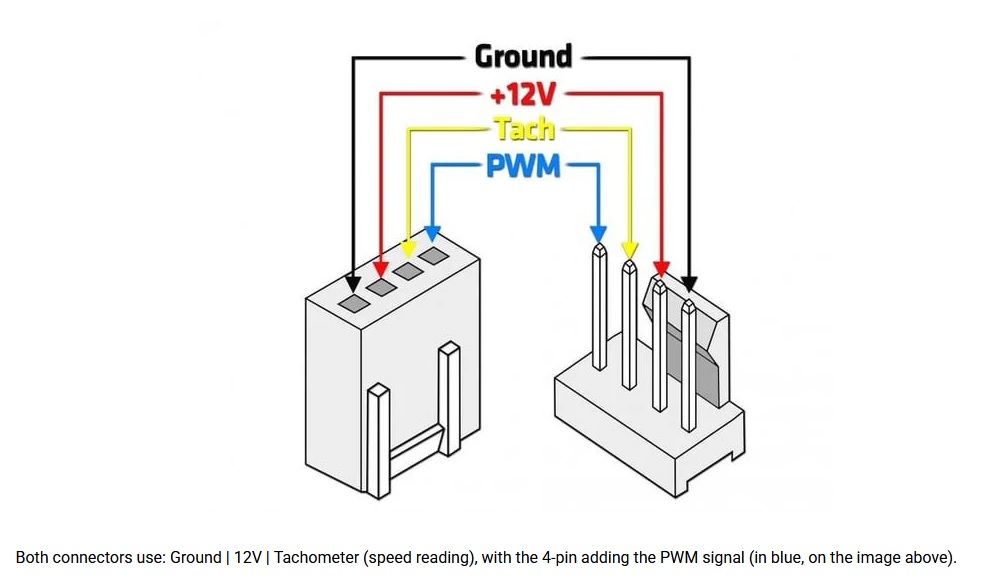
*credit for image goes to Atila Gobor*
- 4-Pin Connectivity: Unlike older 3-pin DC fans, PWM models use a dedicated 4th pin for the digital speed control signal. This allows the motherboard to directly command the motor, eliminating voltage-based speed limitations.
- The Duty Cycle: Rather than stepping down power, PWM works by rapidly switching the motor on and off hundreds of times a second. The "Duty Cycle"—the percentage of time the signal is "on"—dictates the exact RPM.
- Frequency Tuning: These on/off cycles operate at an ultrasonic frequency (typically 25 kHz), well above the human hearing range, ensuring silent operation without annoying electrical buzzing.
- Precision Thermal Management: PWM fans allow users to map highly specific fan curves to component temperatures using BIOS or desktop software. When workloads increase, cooling scales up dynamically; when systems are idle, the RPM drops for near-silent operation.
- Lower Minimum Speeds: Because the motor receives a constant 12V and is controlled digitally rather than by starving the fan of power, PWM fans can safely run at drastically lower RPMs without stalling out.
- Extended Lifespan: By constantly adjusting to the exact thermal demands of the CPU and GPU, these fans rarely run at full throttle, heavily reducing mechanical wear and tear on bearings.
- Airflow vs. Static Pressure: Customers looking for general case cooling focus on Airflow (measured in CFM), while liquid cooling radiators and heatsinks require high Static Pressure (measured in mm-H2O) to force air through dense fins.
- Bearing Types: The internal bearing design dictates longevity and noise. Premium models utilize Fluid Dynamic Bearings (FDB) or Magnetic Domes for maximum durability and minimal friction.
- Zero RPM Capability: Many modern PWM fans feature a Zero RPM mode, completely stopping fan rotation at low loads for total silence.
- Daisy-Chaining: To optimize cable management and make setup easier, many PWM fans now offer daisy-chaining technology, allowing multiple 4-pin fans to link together and share a single motherboard header.
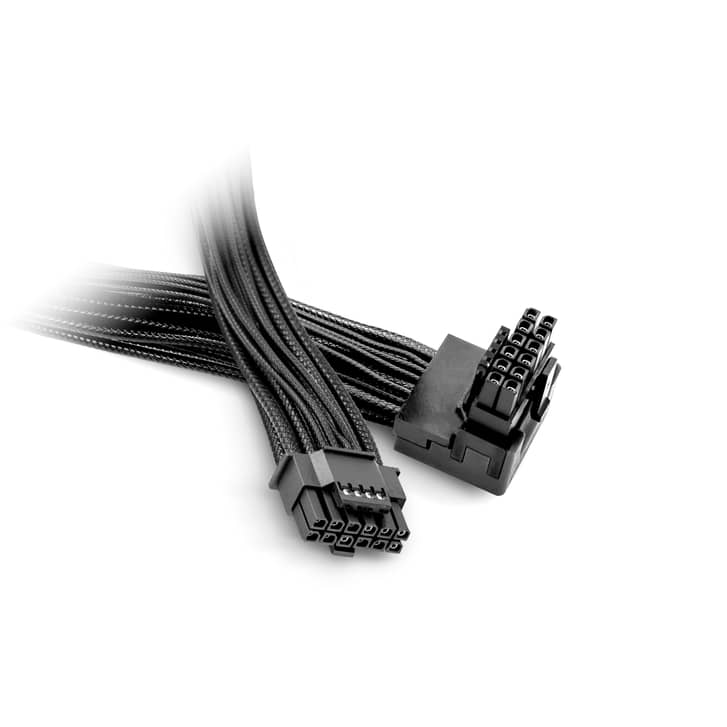
The 12VHPWR is a 16-pin (12+4) PCIe connector that delivers up to 600W of power. Designed for high-end GPUs like the Nvidia RTX 40 and 50 series, it consolidates multiple traditional 8-pin cables into a single connection, saving space. Note that it has mostly been replaced by an updated, safer standard called 12V-2x6.
The Original 12VHPWR vs. 12V-2x6
The original 12VHPWR connector was prone to melting or failing if not fully seated, as bending the cable too close to the connector could cause the pins to lose contact. Because of these issues, the industry transitioned to the 12V-2x6 connector (often marketed under the same PCIe 5.0 umbrella). This updated design features recessed, shorter sensing pins and longer power terminals, ensuring power cuts off completely unless the plug is perfectly inserted.
Best Practices and Safety
To prevent catastrophic failures, follow these rules:
- Zero Bend Radius: Do not bend the cable within 35mm of the connector block.
- Firm Connection: Ensure the cable "clicks" into place. There should be zero gap between the male and female housings.
- Native Cables over Adapters: Native 12VHPWR/12V-2x6 cables running directly from an ATX 3.0/3.1 PSU are safer because they reduce the number of potential connection points. If you use the multi-cable "octopus" adapter included with your GPU, make sure all connected 8-pin lines are properly seated into the power supply.
Upgrading and Troubleshooting
If you are currently building a PC or upgrading your power supply, consider these options:
- ATX 3.1 Power Supply: Purchase an ATX 3.1-rated power supply, which includes the native 12V-2x6 cable standard, removing the need for bulky adapters.
- Right-Angle Cables: If you have a wide GPU (like the RTX 4090) that presses against your PC case glass, consider using right-angled cables or adapters (like the Corsair 90-degree 12V-2x6 cable) to avoid putting extreme bends on the wire.

larry's working hard to answer as many questions as possible, if yours hasn't come up yet, please be patient